
Frequently Asked Questions
- How do I contact Support Team?
- What does "ads limit" mean?
- How can I sell on Jiji?
- How to buy something on Jiji?
- How to report illegal activity on Jiji?
- What are Premium Services?
- What is a "marketplace"?
- Do you have any stores?
- How is delivery arranged on Jiji?
- Can I unsubscribe from the newsletter?
- How do I register on Jiji?
- How do I reset my password?
- How do I change my password?
- How do I change my phone number?
- How do I change my email address?
- How do I delete my Jiji account?
- How does login with Google, Facebook, Apple, or Truecaller work?
- How do I keep my account secure?
- Why is my account restricted or blocked?
- Can I have more than one Jiji account?
- How to fix automatic ad sharing issues on Jiji?
- I've posted my ad but I can't find it on Jiji. Why?
- How do I take a selfie that ensures successful ID verification?
- What does the "Verified" badge mean on my store?
- What does a “Verified ID” badge mean, and how can I get it?
- How many people viewed my ad?
- What can I do to sell better?
- How do I set up my Business / Company profile?
- What happens after I click on "Post ad"?
- Posting rules
- Tips for creating an effective ad
- What are draft ads, and how do I publish them?
- What are the requirements for ad photos?
- Why can't I post a new ad? (Category limit reached)
- Prohibited items on Jiji
- How do I add a video to my ad?
- How does Safe Deal work for sellers?
- How can I enable Safe Deal for my ads?
- Who creates a Safe Deal order?
- Who pays the delivery fee for a Safe Deal order?
- When is my Safe Deal payment released?
- How can I check if my item is eligible for Safe Deal?
- How do I choose a delivery service and add tracking?
- How should I pack my order?
- What are the Safe Deal deadlines for sellers?
- How do I check delivery before accepting an order?
- How do I chat with a seller?
- Should I chat or call the seller?
- How does "Contact on WhatsApp" work?
- How do I block someone in chat?
- My ad has been declined. Why?
- Can I share ads on Facebook or Twitter?
- How long does ad moderation take?
- How long will my ads stay on Jiji?
- What is a “low-priority promotion”, and how can I avoid it?
- How do I renew my ad?
- What’s “automatic ad sharing”, and how does it work?
- How do I mark my ad as sold?
- Promo issues due to duplicate ads — why did this happen, and how do I fix it?
- Description: edit to make it relevant
- Photos: remove images with Jiji logos
- Photos: remove non-original images
- Photos: remove irrelevant images
- Photos: remove contact details
- Photos: remove low-quality photos
- Photos: used earlier
- Photos: remove logos
- Video: replace to match the ad
- Mileage: correct to actual (km)
- Color: correct to match the ad
- Duplicate: such ad already exists
- Prohibited: this can’t be posted on Jiji
- Title: remove repeated words
- Title: specify what you offer
- Title: remove contact details
- Category: change to [recommended category]
- Price: adjust to market range
- Photos: remove screenshots
- Photos: remove photos with multiple items
- Photos: remove price
- Photos: remove inscriptions
- Photos: remove nudity images
- What is “Pro Sales”, and how does it work?
- What's new in Pro Sales: Bid Groups
- What’s a bid in “Pro Sales”?
- How do I set up and run a “Pro Sales” campaign?
- What statistics can I see for “Pro Sales” campaigns?
- How long can I use the “Pro Sales” feature?
- What is the difference between the promotion that I get from Boost Packages and “Pro Sales”?
- Can I activate the “Pro Sales” feature without buying a Boost Package?
- Where and how does “Pro Sales” promote my ads?
- When should I use the “Pro Sales” feature?
- What daily budget should I choose for my campaign?
- How can I improve the ad’s CTR to promote it in “Pro Sales”?
- Why can ads for sold or unavailable items affect my Pro Sales results?
- How do replies to chats affect my Pro Sales results?
- How does showing feedback affect my Pro Sales results?
- What are the types of Premium Services on Jiji?
- How to buy Premium Services?
- Upgrade boost
- What to Do After You Request a Call From a Manager
- Should I pay before or after?
- How can I protect myself from being scammed?
- How can I be sure that I'll get what I requested?
- How does Safe Deal work for buyers?
- How do I place a Safe Deal order?
- How much does delivery cost with Safe Deal?
- How do I pay for a Safe Deal order?
- How will the seller deliver my order?
- When should I confirm receipt?
- How can I track my Safe Deal order?
- How do I check if delivery is available to my address?
- How do I cancel an order or request a refund?
- How do I save an ad to my favourites?
- How do I save a search and get notified about new ads?
- How do I follow a seller?
- What is ‘feedback’, and why is it important?
- How to leave feedback about the seller?
- Is there any moderation of feedback?
- How can I react to feedback about sellers that other people posted?
- Can I edit my feedback after it’s published?
- I received negative feedback. What’s the best way to solve this?
- What is ‘Appeal on feedback’, and when should I use it?
- What are the benefits of selling my car with Cars45?
- How does the auction work?
- How to prepare for a car inspection?
- How do I ensure I get the best price for my car?
- Will you ensure the confidentiality of my personal information?
- Where are Cars45 Inspection Centres located?
- What do I do if the inspection report turns out to be non-exhaustive?
- How do I book a car inspection?
- What documents should I bring for inspection?
- Must I book an appointment at the inspection center?
How to leave feedback about the seller?
The "Leave feedback" feature becomes available once you've interacted with the seller. Whether or not you made a deal, share your experience by following the instructions below:
- Click the "Leave feedback" button. You can find it on the ad page or on the seller's profile:

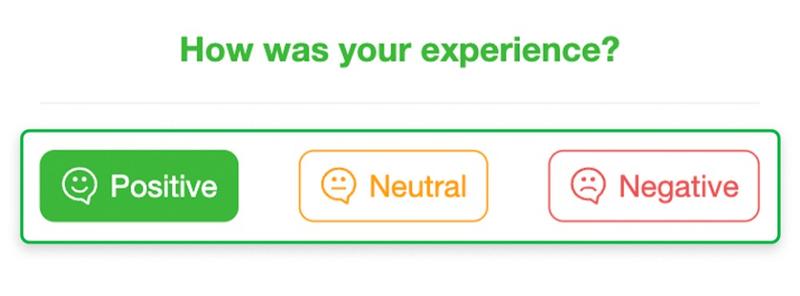
- Rate your experience. Select one of the smileys to specify how satisfied you are:
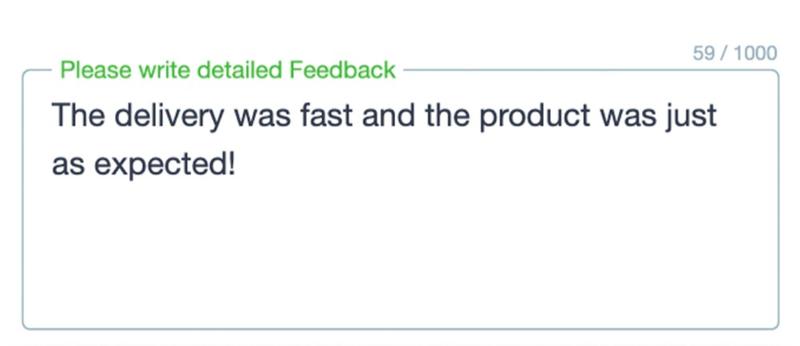
- Provide detailed feedback about the seller. For example, tell us how your communication went — were you treated nicely or left with a bad feeling? Also mention whether you're satisfied with the product and how the delivery went:
- Click "Send feedback":

We review all feedback to ensure it's relevant and in line with our rules. Once it passes review, it becomes visible to all Jiji users.
Thanks for every piece of feedback you leave! You help us build the safest place for all kinds of deals 💚
